I had been using Linear to keep track of the work I was asking agents to do. It gave me a place to organize tasks and follow their progress. As I developed that workflow, I wanted a board I could shape around the way I actually work with agents.
That became Agent Workboard: a local macOS app that connects tasks, agent runs, results, and review. I am building it so I can see what needs attention, connect the services I already use, and move between planning and execution with less context to reconstruct.
Like my shared memory project, this is a tool I want to understand by building and using it. Each integration makes me decide what the board should know, what should stay in another service, and which decisions still need me.
Starting with the work I need to supervise
The questions behind the board are practical. What is an agent working on? Which attempt produced this result? What is waiting for review? If work stops, what does the next session need to continue?
A card needs enough context to answer those questions: a goal, completion criteria, subtasks, an assignee, artifacts, and a next action. Large goals can be broken into smaller pieces without losing their relationship to the original task.
I also keep three kinds of state separate:
| Record | What it describes |
|---|---|
| Task | The outcome I want and its current status |
| Run | One attempt by an agent to work on that task |
| Workflow stage | A step such as implementation, verification, or review |
A task can need several attempts. An agent can finish a response while the task still needs verification. Keeping these records separate helps me understand what happened before deciding what should happen next. Task and storage architecture
A board that people and agents can both use
The same local tasks are available through a desktop kanban app and a command-line interface. I can inspect and organize cards visually; an agent can read its task, record progress, and attach results through commands.
A desktop widget provides a smaller view of current work, deadlines, and items needing attention. It reads a snapshot from the service and shows its update time. macOS controls the actual widget refresh schedule, so I do not treat it as an immediate live feed.
Underneath, a Rust service owns writes to a SQLite database. The app uses SwiftUI, and the widget uses WidgetKit. That shared service keeps the interfaces working with the same task rules. Project overview
The board still feels familiar: Backlog, Todo, In Progress, In Review, Done, and Canceled. The customization is growing around how work enters those states, what evidence stays attached, and how an agent hands work back to me.
Connecting the services I already use
I want the board to fit into my existing environment. A task may relate to a GitHub pull request, a Linear issue, a Slack message, a calendar event, or a research note.
Those connections are separate plugin packages. I can install and enable the ones I need while the core board continues to manage tasks on its own.
| Plugin | The connection it provides |
|---|---|
| Linear | Find issues, attach or import them, and explicitly send status comments or change issue state |
| GitHub | Connect issues and pull requests, inspect linked status, and optionally comment or create an issue |
| Google Workspace | Connect Calendar deadlines and meetings, with optional Gmail search and attachments |
| Slack | Find and attach source messages, import work, and optionally send a selected task's status |
| Agent Memory | Find supporting documents and memories, or submit a deliberately selected memory candidate |
| Orca | Connect local worktrees and terminals, then launch agents for board tasks |
This lets Linear remain part of the environment as I build my own control surface. Importing an issue or linking a source is an explicit action. A board status change does not automatically synchronize every connected service.
The same principle applies to writes. Reading an issue and posting a comment are separate capabilities. The plugin host sends task changes through the board service, and disabling an integration preserves the task and its recorded links. Plugin boundary, Linear integration
The six packages are implemented. Authenticated Google, Slack, and Linear workflows, along with real GitHub write operations, still have their own verification work. Having a plugin available is one step toward using that connection reliably with a real account. Verification record
How I connect Workboard and Orca
In my setup, Workboard holds the task and its progress. Orca provides the local worktree and terminal where an agent runs. A worktree is a separate working directory for a Git repository, so the task can point to the checkout where its work belongs.
The connection follows a concrete path:
- Create a task with its goal and completion criteria.
- Link an Orca worktree from the task card.
- Choose a manual agent launch or configure an automated process.
- Run the agent in an Orca terminal with the task context and a board run ID.
- Inspect the reports, artifacts, and review result on the task.
The launch passes along the goal, criteria, next action, and board instructions. The terminal is linked back to the run, giving me a way to connect the card with the place where the work happened. The integration can also browse connected worktrees and import one as a task or subtask. Orca integration
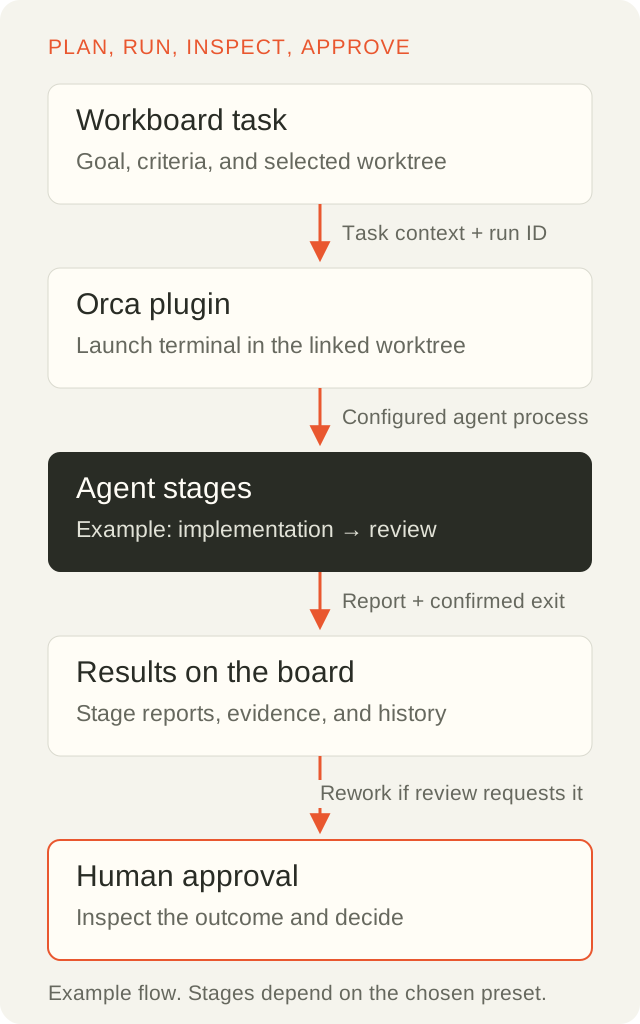
The board records the work and its evidence. Orca supplies the execution environment. Final approval stays with me.
Making automation something I can supervise
The recent work adds reusable process presets. A small task can use implementation followed by review. A larger process can include planning, verification, and release preparation. Each stage can carry its own agent choice, skills, prompt, and instructions.
I can choose a preset myself or let an agent choose from the permitted presets and record its reason. In the installed Workboard project setup, new automated tasks use that selection step. Existing cards retain their saved configuration.
Status rules connect the board to execution. A configured transition into In Progress can start development; a transition into In Review can request an independent review. Manual cards remain available, and creating a card does not itself launch an agent.
The workflow advances after an accepted stage report and confirmed process exit. Review findings can lead to rework within a configured limit. Release preparation records readiness, while deployment and merging remain separate actions. The process waits for human approval at the end. Automation and process presets
This has been exercised through the actual Orca runtime. Local checks include real Codex stage sequences and a real Claude preflight. A later Codex check selected a small process, ran implementation and independent review sessions, and returned to the board awaiting approval. These were small transport and workflow checks, including a task that required no source edits. They establish that the connection works within that scope; longer coding tasks and recovery still need continued use and testing. Recorded local checks
Keeping context with the result
The memory project and Workboard address related parts of continuity. Workboard keeps operational context: the task, its attempts, current stage, artifacts, and next action. Shared memory helps recover decisions and knowledge that may matter across tasks and projects.
The optional memory plugin connects them through selected source reads and explicit captures. Finishing a task does not automatically turn its conversation into accepted long-term memory. Memory integration
Starting from my Linear workflow has helped keep this project grounded in the work I need to manage. Building the custom version is teaching me how much meaning sits behind a status column: who is working, which source version they checked, what they produced, and what still needs a decision.
I want to keep improving that connection between a card, an agent's execution, and my ability to understand the result.
Development note as of October 20, 2026. Implementation links are pinned to the October 18 revision. Verification claims retain the scope of the linked records.
Thanks for reading. Keep following your curiosity.